Is Claude Code Free? Install Guide, Plus 9Router and REA from GitHub Explained
Is Claude Code free in 2026? Real pricing in plain words, a step-by-step install for Windows, Mac and VS Code, plus 9Router and REE from GitHub explained

Short answer: no. The free Claude plan does not include Claude Code. You need a paid plan, starting with Pro at $20 a month, or pay-as-you-go API credits.
That hasn't stopped the searches. In India this month, "free claude code", "install claude code" and "claude code github" are among the top searches around Claude Code. Two GitHub tools, 9Router and REA, have jumped to breakout status in the same period.
This guide answers all of it in one place:
What Claude Code actually costs, from Anthropic's own pricing page
How to install it on Windows, Mac or Linux, and use it inside VS Code
What 9Router is, how it offers "free" Claude Code, and the risks
What REA on GitHub is, since two different tools share that name
Which option makes sense for you
We're Remnow Solutions, a software and web development company in Madurai. We build custom software, websites and apps for businesses, and we follow these tools closely.
In this guide
Is Claude Code free?
No. Anthropic's pricing page lists Claude Code as "No" on the Free plan and "Yes" on every paid plan. The setup docs say the same: you need a Pro, Max, Team, Enterprise or Console account. The install itself is free, but it won't work until you sign in with one of these.
Plan
Price (USD, before tax)
Claude Code
Good for
Free
$0
Not included
Trying Claude chat only
Pro
$20/month, or $17/month billed yearly ($200 upfront)
Included
Freelancers and light daily coding
Max 5x / 20x
From $100/month
Included, 5x or 20x Pro's usage
Developers coding all day
Team, Standard seat
$25/month, or $20/month billed yearly
Included
Teams of 2 to 150
Team, Premium seat
$125/month, or $100/month billed yearly
Included, 5x Standard's usage
Heavy users inside a team
API (Console)
Pay per use
Works with an API key
Occasional or automated use
Two things people miss:
One shared limit. Claude Code and Claude chat draw from the same usage pool. Heavy coding leaves less room for chatting, and the reverse.
Limits reset. Usage works on a rolling five-hour window, and paid plans add weekly limits on top. When you hit a limit, you wait, upgrade, or switch on paid usage credits.
What it costs in India (in rupees)
Anthropic bills in US dollars, so the rupee amount depends on the exchange rate. At about ₹97 to the dollar (mid-market rate, mid-October 2026):
Plan
USD price
Approx. in INR
Pro, monthly
$20/month
about ₹1,940/month
Pro, yearly
$200/year
about ₹19,400/year
Max
From $100/month
about ₹9,700/month and up
These are rough figures before tax. Your bank converts at its own rate and usually adds a foreign currency markup, so your card statement will likely show a little more. Check the live rate before you subscribe.
Paying with an Indian card. Under RBI's 2026 e-mandate rules, which also cover international subscriptions, you approve a recurring payment once with an extra check such as an OTP. After that, renewals up to ₹15,000 go through automatically. Anything above ₹15,000, like the yearly Pro plan, needs your approval each time. Also make sure international online transactions are switched on for your card in your bank app, or the payment may fail.
So what's the cheapest legitimate route? For almost everyone using it regularly, it's Pro. Anthropic's cost guide says that across business deployments, API usage averages about $13 per developer per active day, and stays under $30 a day for 90% of users. At that average, just two days of coding in a month (around $26) already costs more than Pro's $20. Your own costs may be lower for small tasks, but the API only works out cheaper if you use Claude Code once or twice a month, or for automation.
How to install Claude Code (Windows, Mac, Linux and VS Code)
Installing takes about five minutes. Every command below comes from Anthropic's official setup guide.
Before you start, check you have:
Windows 10 (version 1809 or later), macOS 13 or later, or Ubuntu 20.04 or later
At least 4 GB of RAM and an internet connection
A paid Claude plan or a Console (API) account
Step 1: Open a terminal. On Windows, open PowerShell from the Start menu. On Mac, open Terminal.
Step 2: Run the install command for your system.
Mac, Linux or WSL:
curl -fsSL https://claude.ai/install.sh | bashWindows PowerShell:
irm https://claude.ai/install.ps1 | iexWindows CMD:
curl -fsSL https://claude.ai/install.cmd -o install.cmd && install.cmd && del install.cmdPrefer a package manager? Use brew install --cask claude-code on Mac, or winget install Anthropic.ClaudeCode on Windows. These two don't update automatically, so you'll need to upgrade them yourself.
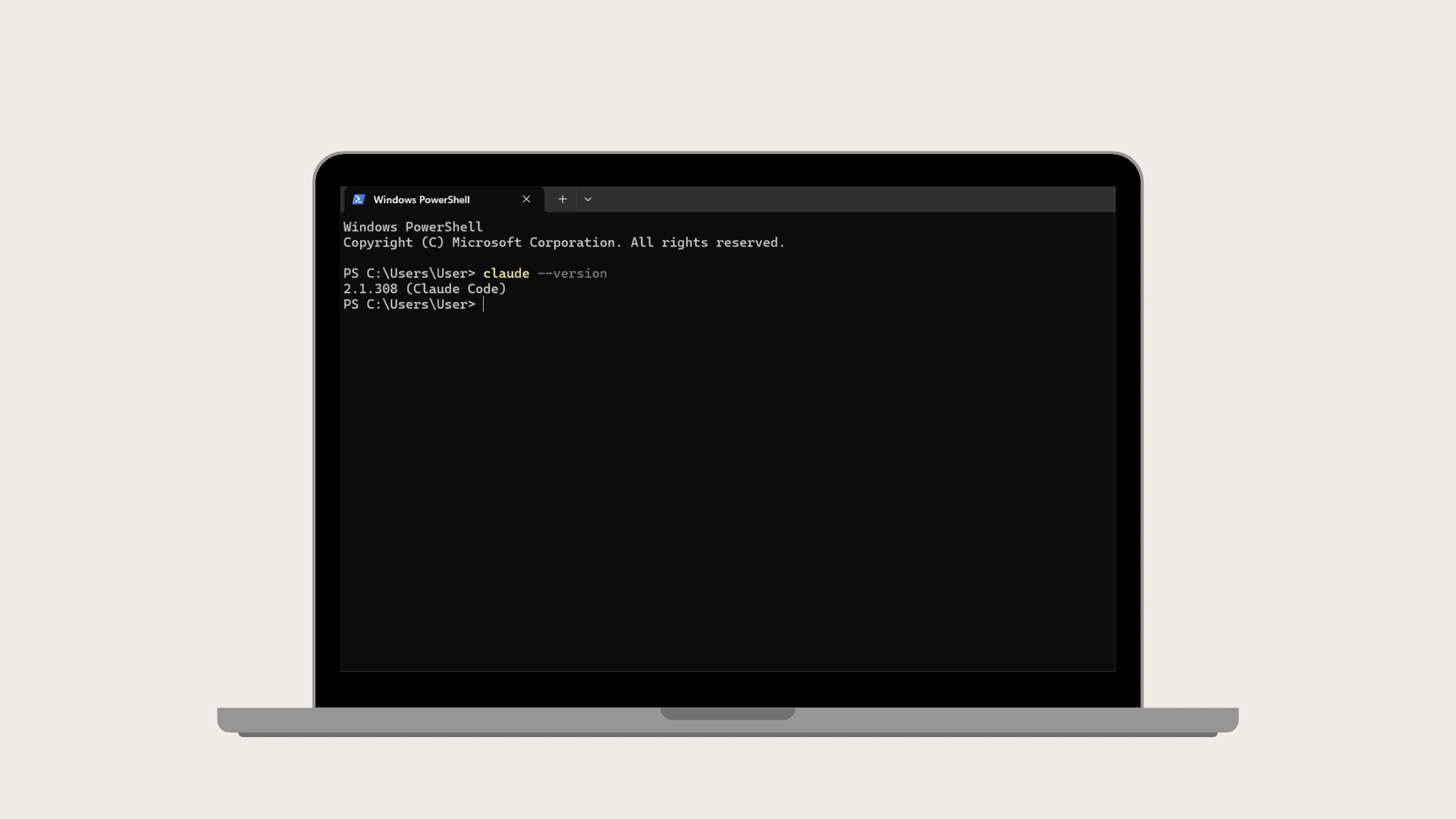
Step 3: Check it worked. Open a new terminal window and run:
claude --versionYou should see a version number. If you get "command not found", close and reopen the terminal. If it still fails, see Anthropic's install troubleshooting page.
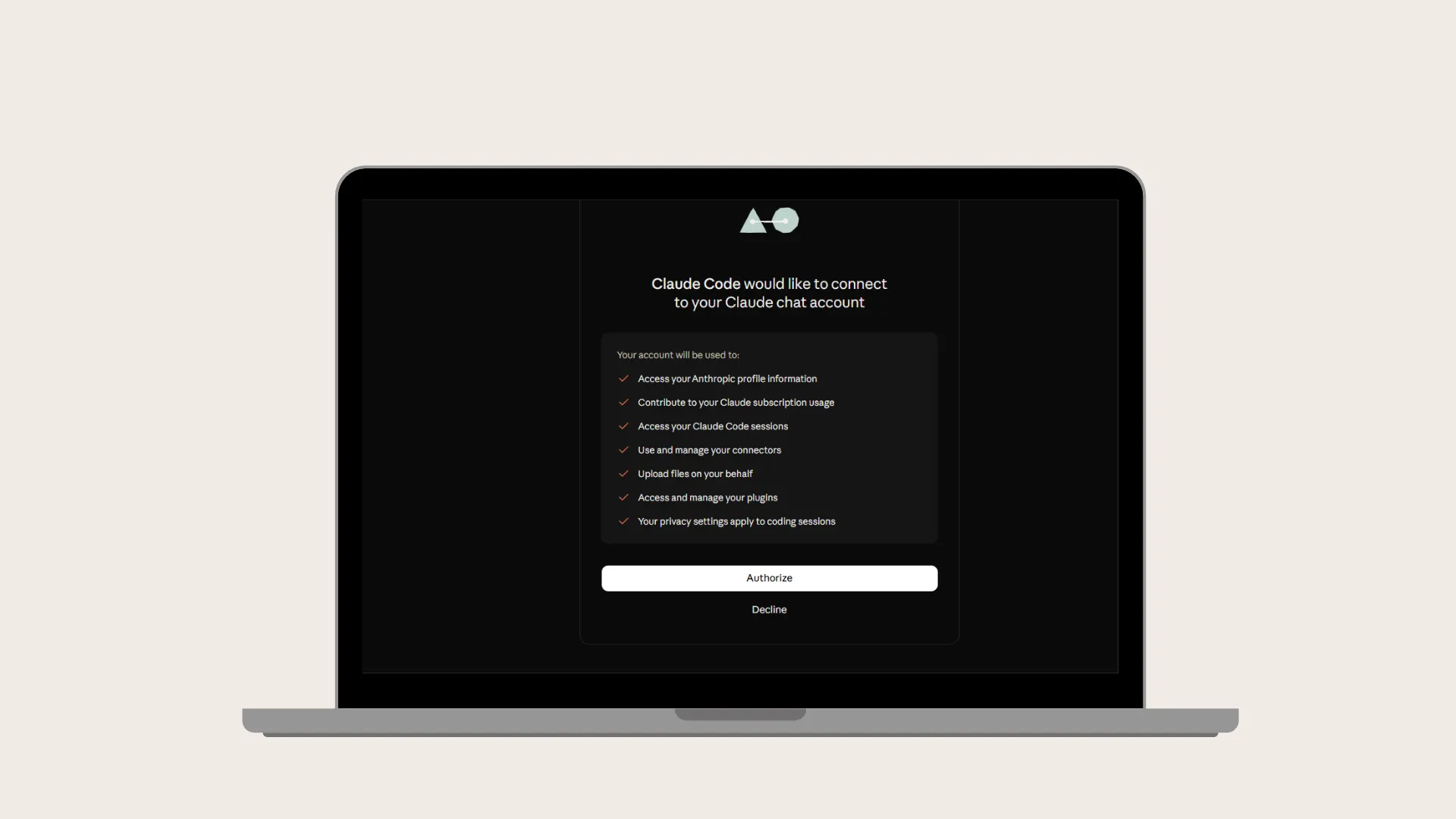
Step 4: Sign in. Go to your project folder in the terminal and type claude. A browser window opens. Sign in with your Claude account and you're ready.
Windows tip: installing Git for Windows is optional but recommended. Without it, Claude Code uses PowerShell for commands instead of Bash.
Prefer no terminal at all? Claude Code also runs inside the Claude desktop app for Windows and Mac, with a Linux version in beta. You get the same coding help in a normal app window, no commands needed.
Use Claude Code inside VS Code
If you'd rather not work in a terminal, the VS Code extension gives you a chat panel inside your editor.
Make sure VS Code is version 1.94 or later.
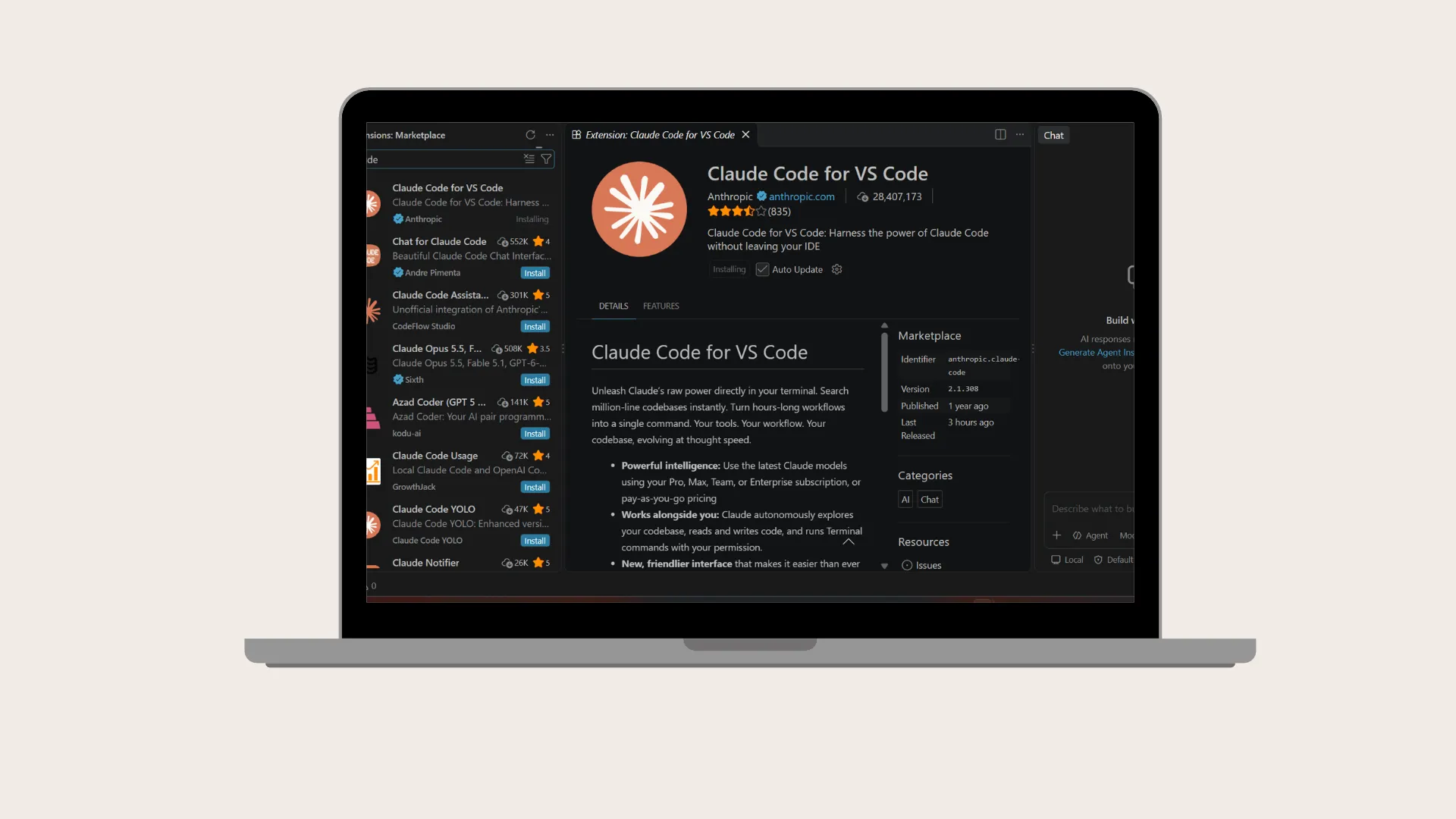
Press
Ctrl+Shift+X(Windows) orCmd+Shift+X(Mac), search for "Claude Code", and click Install.Open any file, then click the Spark icon at the top right of the editor.
Click Sign in and finish in your browser. No API key is needed with a paid plan.
Type what you want, for example "explain this file" or "fix the error on line 42".
Switch the mode at the bottom of the prompt box to **Manual** if you want Claude to show each edit side by side and ask before applying it. One catch: the extension doesn't add claude to your terminal. To use the command line inside VS Code too, do the full install above as well.
9Router explained: is it really "free Claude Code"?
9Router doesn't make Anthropic's Claude Code plans free. It lets the Claude Code app talk to other AI providers, some of which have free tiers.
9Router is an open-source tool (MIT licence) with over 30,000 stars on GitHub. It runs on your own computer as a small local server. You point your coding tool at it, and it forwards each request to whichever AI provider you've connected.
Its headline feature is a three-level fallback:
Your subscription first, such as Claude Pro, ChatGPT or GitHub Copilot
Cheap paid models next, such as GLM or MiniMax, when your subscription limit runs out
Free tiers last, such as Kiro, OpenCode Free or Google Vertex trial credits
It also compresses tool output like git diff before sending it, which the README says saves 20 to 40% of input tokens.
Where the "free" comes from
The free part is other companies' free tiers, and the README itself lists their limits:
Kiro AI: about 50 credits a month free, with paid plans above that
OpenCode Free: the list of free models changes over time, without notice
Google Vertex AI: $300 in credits for new Google Cloud accounts, for 90 days
So "free Claude Code" really means the Claude Code app running on free-tier models, within those limits. It's useful for learning and side projects. It isn't unlimited.
The risks to know before you install it
Your keys pass through it. You give 9Router your provider logins and API keys, and it stores them in a local database. Treat the machine running it like a safe holding passwords.
Change the default password. If you don't set one, the dashboard password defaults to
123456. Never expose 9Router to the internet without setting a password and requiring an API key.Check you have the original. Several copies exist under other GitHub accounts. The original is
decolua/9router.Read each provider's terms. Spreading one subscription across tools, or rotating several accounts, may break a provider's rules. Anthropic's docs say it doesn't endorse or audit third-party gateways, and doesn't support routing Claude Code to non-Claude models through any gateway.
Expect rough edges. You'll get less support. If something breaks, Anthropic can't help with a setup it doesn't support.
Our view: fine for experiments and personal projects on a test machine. For client work or anything with real business data, use an official plan or API account.
REA on GitHub explained: two different tools, one name
Search "rea github" and you'll find two unrelated projects. Both work with Claude Code, which is why they show up in the same searches.
REA: Reverse Engineering Assistant
REA: governance layer for Claude Code
GitHub
What it does
Analyses a program or firmware file and writes a report on what it contains and does
Adds safety rules, blocked actions, audit logs and a kill switch to Claude Code
Who it's for
Security researchers, malware analysts, CTF players
Teams who want tighter control over an AI coding agent
Output
A Markdown, PDF and JSON report next to the file
Policy file, hooks and an audit log inside your project
Works with Claude Code
Yes, as an MCP server (claude mcp add rea rea serve)
Yes, installs hooks into your .claude folder
Needs internet or AI key
No; it runs fully offline without a key
Uses OpenAI's Codex for its pre-push code review by default
Activity at time of writing
About 65 stars
Very new, no stars yet
Licence
MIT
MIT
Which one are people searching for? Our reading of the search trend is that most people mean the Reverse Engineering Assistant. "Reverse engineer anything github" is rising alongside "rea github", and it's the more established of the two. Google Trends doesn't show which repository people click, though, so treat this as an educated guess.
What the Reverse Engineering Assistant does
You point it at a file, such as a Windows .exe, an Android app or router firmware, with one command:
rea ./sample.exeIt writes three reports next to the file. Inside, you'll find what the file is, which functions it contains, suspicious strings like URLs and IP addresses, and security weaknesses. It's built in Rust and needs nothing else installed. With an optional AI key it adds a written security assessment; without one, it runs offline.
Use it responsibly. Only analyse files you own or have permission to examine. Reverse engineering someone else's software can break licence terms or local law.
Is the governance REA useful for businesses?
Potentially, if your team lets an AI agent write code in client projects. It can block risky commands, stop the agent reading .env files that hold passwords, and record every action. It's new and has little community use yet, so test it on a side project first.
Which option should you choose?
For most people starting out, Claude Pro is the simplest official route. Here's how the options compare:
Option
Monthly cost
Best for
The catch
Free Claude plan
$0
Asking coding questions in chat
No Claude Code at all
Claude Pro
$20 ($17 if paid yearly)
Students, freelancers, small projects
Usage limits reset every five hours
Claude Max
From $100
Developers coding all day
Costly if you don't use it fully
API (Console) account
Pay per use
Occasional use or automation
Bills can rise fast on big tasks
9Router with free tiers
$0 within free limits
Learning and experiments
Not Claude's own plans, limited credits, security risks
A simple rule of thumb:
Just curious? Use the free Claude chat to ask coding questions first.
Building real projects? Start with Pro and upgrade only if you keep hitting limits.
Working with client code or business data? Stick to official plans.
Need software built, not just a tool?
AI coding tools make developers faster. They don't replace planning, testing, security and support, which is what a real business application needs.
Remnow Solutions is an IT company in Madurai that builds:
Custom software for your specific operations, from internal tools to customer-facing apps (Technology Solutions)
Websites and web apps designed to be found on Google and built to convert (Web Development)
Skilled developers on demand through staff augmentation, when your team needs extra hands
Tell us what you're trying to build. We'll tell you honestly what it takes in scope, timeline and cost.
Start a project · Call +91-99941 64140 · Email info@remnow.co.in
Frequently asked questions
Is Claude Code free to use?
No. Installing it is free, but using it needs a paid Claude plan (Pro, Max, Team or Enterprise) or a Console API account. The free Claude plan doesn't include it.
How much does Claude Code cost in India?
Plans are priced in US dollars. Pro is $20 a month (about ₹1,940 at mid-October 2026 rates) or $200 a year. Max starts at $100 a month (about ₹9,700). Prices exclude tax, and your bank may add a currency conversion markup.
Can I use Claude Code in VS Code?
Yes. Install the official "Claude Code" extension from the VS Code Extensions view and sign in with a paid account. You need VS Code 1.94 or later.
Does Claude Code work on Windows?
Yes, on Windows 10 (version 1809) or later. Install it from PowerShell with irm https://claude.ai/install.ps1 | iex.
Is 9Router safe?
It's open source and widely used, but your API keys and logins pass through it. Change the default password, never expose it to the internet, and avoid it for client or business data.
Does 9Router give unlimited free Claude Code?
No. It connects the Claude Code app to other providers' free tiers, which have limits, such as about 50 free credits a month on Kiro.
What is REA on GitHub?
Two different tools share the name: a Reverse Engineering Assistant that analyses program files, and a governance layer that adds safety rules to Claude Code. Most searches are likely for the reverse engineering tool.
Want this expertise on your project?
Talk to us